



Table of Contents
Home / Blog / Web Development
10 Proven Strategies to Boost Your Web App Speed

by

January 5, 2026

by
January 5, 2026
Introduction
Ever clicked on a web app that took too long to load and instantly lost interest?
Your users feel the same way. In the digital world where everything operates at a fast pace, web app speed is not only a matter of convenience but of ensuring that people do not bounce before they even get to view whatever you have to offer.
The slow performance does not only annoy users, but also negatively impacts your business to be found in search, reduces your conversions, and causes potential consumers to go directly to find competitors that are faster and smoother. With so many options awaiting, people just cannot afford to wait around until an app loads slowly, or stutters.
The good news? You can fix it. In this guide, we will be discussing 10 real-world strategies that would boost your web app speed, in actual examples of companies that 5X, 10X, and 12X increased their performance. These tips can make your site smarter with caching, deliver code faster and smoother and create an optimized database query that will keep users interested the second they visit your site.
What’s Actually Slowing Your Web App Down?
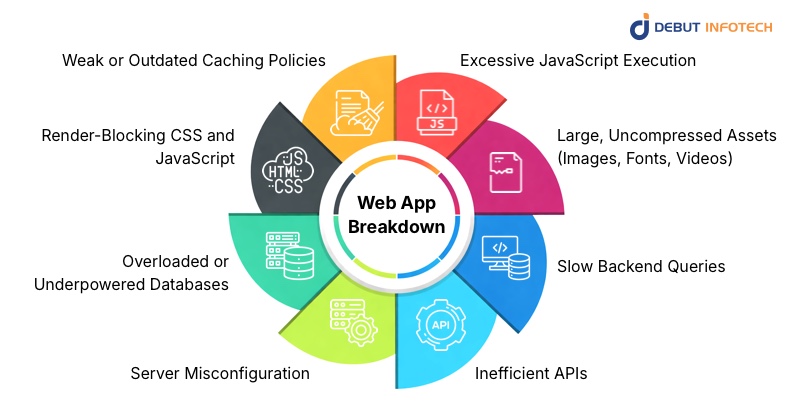
Before you can make your web app much faster, it would be good to identify what is slowing performance in the first place, especially when teams plan to hire web developers to address speed and scalability challenges. The majority of the problems that impact the page load speed are simple to ignore until they begin to accumulate. The following is a better breakdown of what could be stalling your app:
- Excessive JavaScript Execution
Excessive JavaScript or badly optimized JavaScript forces the browser to put all other activities on hold until it has processed the code. This is even more of an issue on phones, which have slower hardware. The result? Slow response time, screen freeze and a frustrating interface.
- Large, Uncompressed Assets (Images, Fonts, Videos)
Good images and videos are beautiful, but when they are not compressed or resized, they take ages to load. The web browser will not render meaningful information until such huge files have been downloaded, which is detrimental to the speed of page loading and leaves the users in suspense.
- Slow Backend Queries
Your web app is only as fast as your backend. When your database is too slow to respond to queries, say it does not have a required index, or has inefficient queries, every user action also becomes slower. Even heavily optimized fronts will not help to make up for a slow backend.
- Inefficient APIs
APIs that have excessive response sizes, multiple round trips, and those that are not properly structured introduce unwanted delays. Users are left gazing at spinners since the application is holding up data which might have been provided faster in the case the API was better designed.
- Server Misconfiguration
It is not necessarily your code that is the problem, your server.It is not necessarily your code that is the problem, at times it is your server. Wrongly configured caching or old-fashioned software or bad routing policies or lack of resources can all slow down your web app. A single incorrect setting can cause a performance bottleneck to the whole system.
- Overloaded or Underpowered Databases
Everything slows down when your database is being overloaded with traffic that it was not originally designed for. Simple queries can take several seconds rather than milliseconds to complete because of high CPU utilization, a low-memory capacity or unoptimized tables and the user will experience all of that delay.
- Render-Blocking CSS and JavaScript
When your app loads styles and scripts such that they prevent the rendering process, the browser will not display anything until such files have been fully downloaded. This gives the irritating blank page effect that the users are greeted by before your content finally loads.
- Weak or Outdated Caching Policies
Without intelligent caching policies, your application repeats the loading of the same files and data over and over. Powerful caching must enable the browsers, CDN and servers to reuse the past results, reducing load time by a significant factor. Those speed gains are lost when there is poor caching configuration.
The initial step towards increasing performance is learning about these bottlenecks. When you understand what is making things run slowly, you can use special fixes that do make the needle move to optimize speed for smoother custom software development services, and bring your web app a step closer to the experience of fast and smoothness users are expecting. As soon as you find out what is slowing things down, you can use selective tradeoffs that do indeed move the needle and bring your web app much closer to the fast, smooth user experience that is desired.
Turn slow load times into your next growth engine!
Discover our tailored web app speed solutions that boost conversions, enhance UX, and outperform competitors.
How to Boost Your Web App Speed by 10x (Practical Steps Anyone Can Apply)
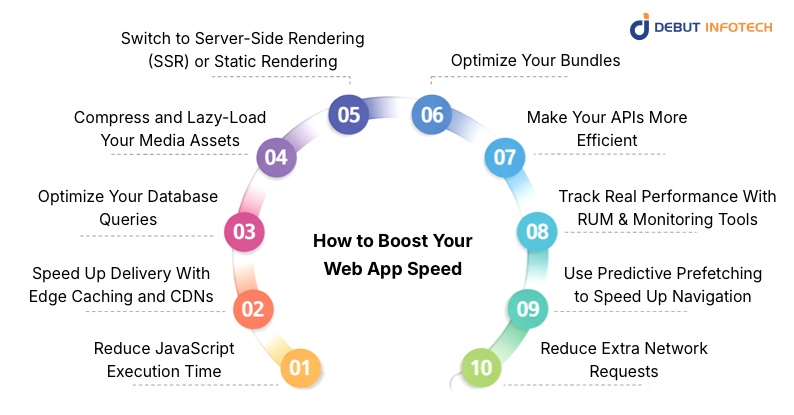
Enhancing the performance of your app does not necessarily imply having to start afresh. Other times, a simple change in the right places can dramatically decrease your web app loading time, and make the experience of using it seem smoother altogether. Here’s a deeper look at how each improvement works and why it matters.
Related Read: Top Web Performance Optimization Techniques to Boost Speed and Reliability
1. Reduce JavaScript Execution Time
When your app seems slow or unresponsive there is a high probability that JavaScript is doing too much for you. Delays are immediately experienced when the browser needs to run a heavy script. The solution to this is to load just those pieces of your code that you actually need at any given time, rather than all of it. You can also replace large libraries with smaller libraries that do the same task. When your app contains complicated tasks such as sorting large datasets, it is a good idea to push that work into Web Workers so that the interface can remain smooth allowing users to keep interacting without any stops or starts.
2. Speed Up Delivery With Edge Caching and CDNs
No matter their location, users will demand your app to be fast and responsive. This is where edge caching and CDNs come in handy. They host your content in locations nearer to your users making your app load faster for everyone and not just those who are close to your server. When you pre-render HTML at the edge, pages start loading instantly. And when you also allow your pictures to be optimized by the CDN, as they load, you save the user’s time from downloading files that are larger than they require. All this contributes to producing a more enjoyable experience that is faster.
3. Optimize Your Database Queries
A snarling database can slow down your entire frontend making all your frontend optimizations worthless. This is among the least considered causes of delays. Occasionally, the application continues retrieving the same information repeatedly, or the database is forced to search massive tables due to the lack of appropriate indexes. Mending these problems makes a big difference. Caching frequent requests with Redis and splitting the load across read-replicas helps keep your app responsive even during traffic spikes. Users will not notice what is going on behind the scenes, but they will certainly notice the increased speed.
4. Compress and Lazy-Load Your Media Assets
Photos, texts, and videos can be the largest files of your application, which can slow down things fast. Your pictures can be turned to newer formats such as WebP or AVIF, which provides users with high quality and small file sizes. Allowing the text to load instantly as fonts are downloaded in the background which eliminates the embarrassing “blank text” situations. Lazy loading is also beneficial as your app will not load all the content at the same time, only that which the user can see. In the case of videos, it is important to keep them lightweight, or stream them to achieve smooth operation even when the network is slow.
5. Switch to Server-Side Rendering (SSR) or Static Rendering
When users stare at a blank screen as your app loads, there is a likelihood that the browser is overworking itself. Server-side rendering (SSR) and static site generation (SSG) shift that work to the server, therefore, users are presented with content in near real-time. Frameworks such as Next.js, Astro, and Nuxt simplify this process. They either create pages in advance or they execute them on the server such that your app is alive the moment it gets visited. This greatly minimizes the wait time before your users can really use your app.
6. Optimize Your Bundles
Big bundles are a hidden drag on performance, especially for people on mobile networks. You can fix this by loading only the most essential resources upfront and cleaning out unused CSS so the browser has less to process. The transition to HTTP/3 has the benefit of enhancing the speed and stability of connection. And by using modern compression tools such as Brotli or Zstd to compress your files, everything loads quicker. These changes may not appear to be that big individually, but they do make a difference in having a smoother experience.
7. Make Your APIs More Efficient
Your backend plays a huge role in how fast your app feels. Switching to GraphQL or tRPC helps you send and receive only the data that truly matters. Cutting down payload sizes and using pagination keeps things lightweight, especially when handling large lists or feeds. And with compression enabled, your API responses reach users more quickly. When your backend communicates efficiently, users enjoy a faster, more responsive app.
8. Track Real Performance With RUM and Monitoring Tools
Rather than speculating on what is slowing down your application, real user monitoring services provide you with the performance experience as seen by your users. Tools such as Google CrUX, Lighthouse CI, Datadog RUM, or New Relic Browser emphasize the actual bottlenecks, be it slow rendering, slow scripts, or slow backend. Knowing real-world performance enables you to resolve the issues that have the greatest significance to the people who use your app.
9. Use Predictive Prefetching to Speed Up Navigation
One of such tricks is predictive prefetching which seems like magic to users. It preloads the pages that they are likely to visit next even before they can press a button. Tools like Quicklink and Guess.js analyze browsing patterns and prefetch in the background. The result? Your app feels twice or even three times faster during navigation without major engineering work.
10. Reduce Extra Network Requests
Every request your app makes adds a tiny delay and those delays add up. Combining API calls, removing unnecessary redirects, and keeping connections alive all help reduce waiting time. Service Workers are especially powerful here because they let your app store frequently accessed files locally. That means users can load parts of your app instantly, even with weak or unstable internet.
Ready to leave slow web apps behind?
Let’s build a lightning-fast experience that keeps users engaged and coming back for more.
Final Thoughts
With the transition to mobile-first browsing by an increasing number of users, at least one point becomes obvious: your web app speed can make or break the experience. People get irritated with slow pages and get convinced with the fast ones, that is all there is to it. When your app loads quickly and responds instantly, users feel it. They like the flow, spend more time, and are much more likely to act.
And if you want to build a web app so fast that you can get the first tap off, it helps to have a team that has been there several times. Debut Infotech, a top web development company, has a history of creating web applications that can load within milliseconds, not seconds, and the performance of the web applications does not decrease with scale.
The digital world is becoming increasingly crowded and speed is no longer a luxury. Provide a quick, smooth experience and you are already miles ahead of the competition.
Frequently Asked Questions (FAQs)
Q. Are apps faster than websites?
A. In most cases, yes. An effective mobile application tends to be quicker since it keeps the main information on your phone. It minimizes the process of having to constantly access a server to extract information.
Apps are also based on native code that is efficient which makes things load and respond fast. Most of them even allow one to work offline or pre-load data and user preferences to enable a more immediate experience.
Websites, in their turn, require extensive use of JavaScript and your connection to the internet. This is why the apps can become smoother and more responsive, particularly in cases when the appropriate tech stack for web development.
Q. Does Cloudflare speed up websites?
A. Yes, Cloudflare has the ability to increase the speed of your site by a substantial margin. It delivers your content through a global Content Delivery Network (CDN) which keeps your content nearer to the users thereby minimizing latency and load time. Cloudflare also has intelligent performance capabilities such as its “Speed Brain”, which is able to predict and pre-load pages so they will load almost instantly. Collectively, these instruments render websites quicker, smoother and responsive to those who use them globally.
Q. What is a good website load speed?
A. A good website loading time is less than 2.5 seconds. Google suggests that you should have your Largest Contentful Paint (LCP) at 2.5 seconds or lower, in order to have a smooth user experience.
However, to get more active, you should target a range from 1 to 2 seconds which is ideal.
Why does this matter? Due to the fact that over half of the people who access a site abandon it after it takes over 3 seconds to load.
Quick websites work better in all aspects. They maintain user satisfaction, are more interactive, and are placed higher on the search engine results. Actually, numerous high ranking sites take less than 1.5 seconds to load.
Our Latest Insights


Leave a Comment