



Table of Contents
Home / Blog / Mobile Development
App Store Guidelines Explained: A Simple Guide to Faster Apple App Approvals

by

November 21, 2025
by
November 21, 2025
Submitting an app to the App Store is like waiting at the gate of a fortress, and hopefully receiving an acceptance mail and fearing the worst possible notice of rejection. We’ve all been there from endless delays to confusing rejections, and not knowing what to do.
The good news though is that the purpose of the Apple App Store guidelines is not to complicate your life. As a matter of fact, they are there in order to safeguard users and to verify that apps are secure, functional and of good quality. When you are aware of what Apple reviewers are seeking, you can also pass through the approval process without the stress.
In this post, we’re breaking down Apple’s guidelines into simple, actionable pillars that will help your app get approved faster and with fewer hiccups. And just to keep things interesting, did you know Apple reviews 90% of apps within 24 hours? That means with the right approach, you could see your app live in record time.
Let’s dive in!
What Are Apple’s App Store Review Guidelines?
Having gone through the App review process, you realize that it does not involve the simple process of checking some options and clicking on the “submit” button. Apple App Store Review Guidelines is the rulebook that helps ensure that the App Store is a safe, reliable, and quality space to users and is a fair and transparent one to developers.
These are rules that define each phase of the lifecycle of your application, the first line of code developed, and the last “Approved” label before sending it to market. Imagine them as your guide to creating apps that do not only work perfectly, but also comply with the privacy, performance and user experience requirements of the Apple model.
To simplify matters, the review of Apple can be explained using five broad pillars which are Safety, Performance, Business, Design, and Legal. Collectively, they give us a clear picture of the contents that the reviewers are seeking and how you can make your app match in order to be approved very fast.
Read also other blog: Top 10 Mobile App Development Companies of 2025
Understanding these pillars at the beginning of your development process is not merely a compliance issue, it is also about preparing your app to be successful at the very beginning.
Stuck on an App Store guideline?
Get a free consultation with our experts to fast-track your app’s approval.
The 5 Pillars of App Store Review: A Developer’s Roadmap
The review of your app in the App Store should not be viewed as a hurdle but rather as a quality check, one that can help your app to be safe, smooth, and ready to shine. Apple reviewers do not mean to put you in a hole, they simply wish to ensure that your application is truly worth something and satisfies the iOS app submission rules that ensure the platform remains consistent and secure.
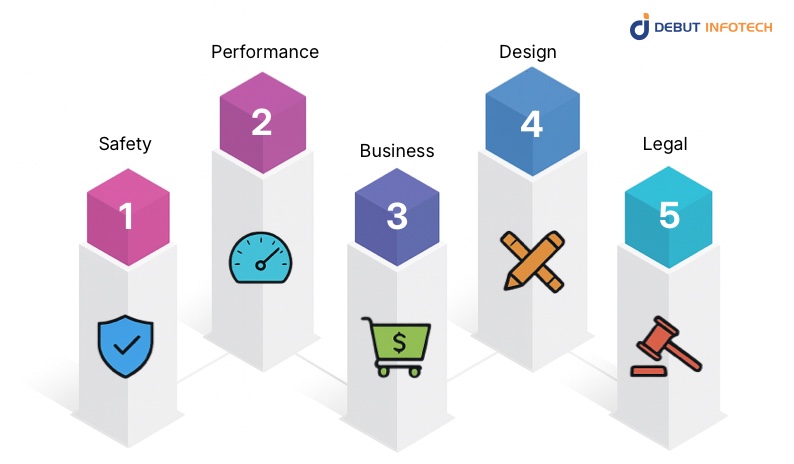
Here’s a quick, actionable look at the five pillars every developer should master before hitting “Submit”:
- Safety: Keep users informed and safe. Moderate user content, explain data permissions clearly, and pay special attention to protecting younger audiences.
- Performance: Stability is everything. Ensure that your application is error-free and does not crash, contains no broken links, and no unfinished beta functionality. Fun fact: nearly 40% of rejections come from performance-related issues, so testing is your best friend.
- Business: Be transparent about transactions. If your app involves payments, stick with Apple’s system for in-app purchases, use honest ad practices, and label everything clearly.
- Design: Create an experience users love. Adhere to the Apple Human Interface Guidelines to create clean, user-friendly, and visually consistent interfaces which are easy to use on iOS.
- Legal: Cover the legal basics. Safeguard intellectual property, and keep your privacy policy short, understandable, and plain written.
Related Read: Top-Rated iOS App Development Companies You Should Know in 2025
Think of your app as a community park. It is a beautiful thing, but only fun when it is secure and well maintained. Apple’s guidelines ensure that every user “visiting” your app feels that same sense of trust and comfort. Mastering these five pillars doesn’t just help you pass the review, it helps you create an app that feels professional, reliable, and built to last.
Inside the Apple App Review Process: Automated and Human Checks
The iOS mobile app development review process is something to understand in order to prevent bumps in the road. As soon as you tap the “submit” button, your application undergoes a thorough review process before it is allowed to find its way onto the App Store. It involves automated processes and human inspection of such activities by the Apple team, and understanding what to anticipate may make the entire process much less stressful.
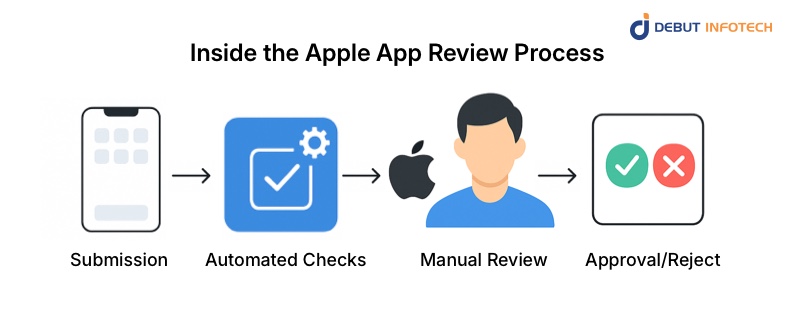
Here’s how it works:
- Submission: You submit your app to Apple for review
- Automated Checks: Apple has a system that performs a first scan of the technical problems and policy breaches.
- Manual Review: After passing the automated checks, a human reviewer dives deeper into your app.
- Approval/Reject: Lastly, either Apple approves your app or it will resend it with some suggestions on how to fix it.
Now, let’s break it down further:
- Automated Checks: First, Apple has a system that verifies such things as whether your application uses the correct API or whether it is the latest SDK requirements. It also looks at your app’s manifest to make sure everything is set up correctly. Consider this step as a check point, which verifies your app against the lowest technical requirements.
- Manual Review: Once the automated checks have been cleared, the human reviewer comes in. They will set up your app to ensure all the features work well, they will also go through your purchase flows to make sure there is transparency, they will also check your metadata (app descriptions and screenshots) and ensure it is correct and also evaluate your user interface according to Apple design standards.
Pro Tip: To accelerate the process and spend more time on approval, it is better to include demo accounts, video demonstrations, or special notes to the reviewer. The more conveniently you make the team at Apple grasp your app, the sooner your approval is likely to come.
Common App Rejection Pitfalls & How to Avoid Them
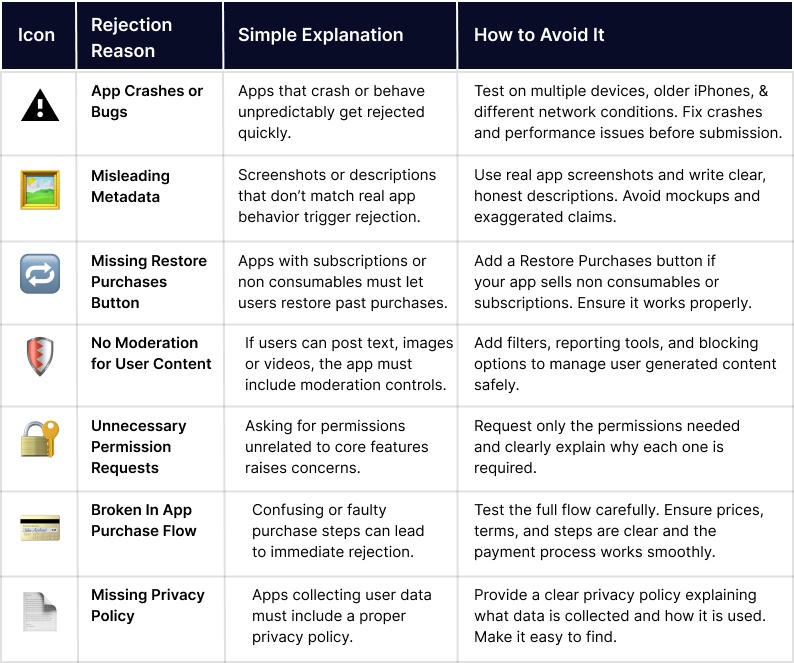
Having your app accepted by Apple does not necessarily have to be a stressful process. Many of the rejections which occur in the App Store review process are because of some typical mistakes which can be easily prevented during the mobile app development lifecycle. Below is the breakdown of some of the most common causes of app rejection and what you can do to make sure that your app passes through the review process without any inconveniences:
1. App Crashes/Bugs
The most common way of having your app rejected is by crashing or having immense bugs that affect its functionality. The review team of Apple will automatically disapprove unstable and unreliable apps.
Prevention Tip: Do a comprehensive testing on a variety of devices, including older versions of iPhones, and make sure that your application works well on different versions of iOS. Do not only test on the new iPhone, ensure that your application works properly on various devices and network characteristics in order to reduce the chances of the application crashing or performance.
2. Misleading Metadata
Unless the description of your app or the screenshots are reflective of what your app is doing, your app will have a high likelihood of rejection. Apple is keen to make sure that its users get to know precisely what to expect once they download an app, therefore, deceptive metadata is a significant warning sign.
Prevention Tip: Only use real, untouched screenshots that demonstrate the actual functionality of your app. No mockups or stock photos are ever the way to go, and you should make your description of your app clear, concise, and representative of the features you will find in the app. Be authentic here, be honest.
3. No “Restore Purchases” Button
In case your application has in-app purchases or subscriptions, Apple will demand the Restore Purchases button. This has the benefit of allowing users who have already purchased content to restore this content in the event of a re-installation of the app or a change in device.
Prevention Tip: Be sure to add a Restore Purchases button in case your app has non-consumable offers or has subscriptions. This is a decisive move, and failure to do this can make your app be rejected. It is a rather basic but necessary tool that helps users to track their purchases.
4. Lack of User-Generated Content (UGC) Moderation
In case your application enables users to post content, be it text, image or video, Apple will require you to have the moderation tools established. Applications that lack effective UGC control, filters, reporting features, or blocking controls are a red flag.
Prevention Tip: Build moderation features directly into your app. This involves content filters, the ability to report inappropriate behavior and the ability to block abusive users. When your application is based on community-sourced content, it is important that you maintain a safe and respectful environment that everyone enjoys.
Read more – iOS App Development Cost: Everything You Need to Know
5. Unnecessary Permission Requests
Apple does not prefer developers to demand an unreasonable number of permissions that do not support the primary purpose of the application. Unreasonable requests, in particular, those that are not clearly described, may lead to rejection.
Prevention Tip: Be selective with the permissions you request. Request only what will be absolutely necessary regarding the features of your app, and clarify why you need each of the permissions. To illustrate, when your application requests access to the camera, be sure to provide the explanation that the application is designed to provide a certain feature, such as taking pictures or scanning.
6. Flawed In-App Purchase Flow
The other reason that can lead to rejection is an unclear or a broken in-app purchase flow. Unless users manage to understand how they can choose to purchase a product or have difficulties with the payment process, your app cannot pass the review.
Prevention Tip: Test the entire in-app purchase flow thoroughly before submission. Make sure that users can locate their purchase easily, read the terms (e.g., the price and renewal), and the payment system should not have any glitches. It is essential that it is transparent and simple.
7. Privacy Policy Omissions
Apple needs a clear and visible privacy policy, particularly when your application is monitoring personal information of users. Unless your app has a privacy policy or an inconclusive one, it will inevitably be declined.
Prevention Tip: Include a comprehensive privacy policy that explains what data your app collects, how it’s used, and how users can control their information. The policy must be located easily in your application and it must be legal. This cannot be compromised in case your application is dealing with sensitive data.
How Apple’s Guidelines Are Evolving in 2026
Apple’s keeping developers on their toes this year and for good reason. The 2026 updates to the App Store Guidelines are all about transparency, privacy, and user trust. If you’ve ever had an app rejected for reasons that seemed unclear, these changes are Apple’s way of making the process more consistent and future-proof.
AI is one of the biggest drivers of these updates. Apps that use AI chatbots or generate content now need to make that clear to users. It’s Apple’s way of promoting honesty in how apps use artificial intelligence so users always know when they’re talking to a bot, not a human.
Privacy has also become more of a center of focus. The Apple App Tracking Transparency framework is being updated with stricter rules of consent so that the user remains in control of his information. There are no longer any secret tracking or ambiguous permissions, and the clarity is the order of the day.
There’s also a compliance angle developers can’t afford to miss. Every app that collects user data, especially health or wellness apps must now include a built-in option for account deletion. It is all a part of Apple as they strive to ensure that user control is the rule rather than an exception.
Read also – How Much Does Mobile App Development Cost In 2026?
It is not only a matter of playing by the rules in order to keep up with these Apple developer policies. It is about gaining trust, not getting your application rejected at the last minute and getting your application the best chance of approval in the least amount of time.
Turn App Store rejections into approvals.
Navigate Apple’s guidelines with our proven compliance framework for seamless, successful app launches.
Final Thoughts
Adherence to App Store Guidelines is not only about getting your app in the store, but it is also about trust. Every update, every feature, every privacy setting tells users that your app values their safety and experience. That is what makes them keep returning
Being compliant is not a one-time activity, but a commitment. Monitor the changing regulations at Apple, be open with your users, and keep updating your application to achieve the best standards. And that is how success is sustained.
In case you need professional assistance to sail through the review process of Apple or make sure that your software passes all compliance checks, Debut Infotech can assist you. Being a top mobile app development company, we have assisted many developers to release apps that not only get approved in a short period of time but also earn the trust of users immediately.
Ready to make compliance easy? Contact us today, and let’s build something exceptional together.
Frequently Asked Questions (FAQs)
Q. What Are App Store Guidelines?
A. App Store guidelines are basically Apple’s rulebook for apps. They outline what’s okay and what’s not, when it comes to how your app works, looks, and protects user data.
These rules exist to keep the App Store safe and ensure every app delivers a great experience for users.
If you’re a developer, following the guidelines isn’t optional. It’s the key to getting your app approved and live on the App Store.
Q. What Are the Main App Store Guidelines for Submitting a New Mobile App?
A. Before submitting your app, make sure it meets the App Store Guidelines for safety, performance, and privacy. Create a developer account, build your app using the latest tools like Xcode, and test it thoroughly to avoid crashes.
Provide honest details, clear screenshots, accurate descriptions, and proper keywords and follow Apple’s App Tracking Transparency (ATT) rules. These steps not only speed up approval but also help you deliver a secure, reliable experience for users.
Q. What Are the Restrictions on In-App Purchases in Leading App Stores?
A. App stores like Apple’s give users strong control over in-app spending. You can turn off in-app purchases, set spending limits, or restrict certain content by age.
Apple’s Screen Time feature adds an extra layer of protection by requiring a password to change these settings, perfect for preventing accidental or unwanted purchases.
For developers, Apple also requires clear pricing and proper management of offer codes to keep things transparent and fair for users.
Our Latest Insights



Leave a Comment