



Table of Contents
Home / Blog / Mobile Development
Top Risks in iOS Development and How to Overcome Them

by

December 11, 2025
by
December 11, 2025
Creating an iOS app is not merely about clean code and polished UI, but it is a high-stakes affair in which a single lapse of judgment can cause delays in launches, triggering of App Store rejection, or even expensive performance problems later on. With the Apple ecosystem changing at a fast pace, developers are confronted with a fresh wave of threats including tighter privacy regulations, changing device specifications, and increased security risks. In fact, globally, mobile users dedicated 3.8 trillion hours to mobile apps in 2021.
Those astounding numbers of usage imply that any harm caused by security errors can be immense. Realizing these risks ahead of time, and knowing how to deal with them, would save the developers time, money, and frustration. In this guide, we breakdown the most prevalent risks in iOS development today, and the effective solutions that can assist a team to produce stable, secure, and App Store-ready products.
Why iOS App Security Matters Today
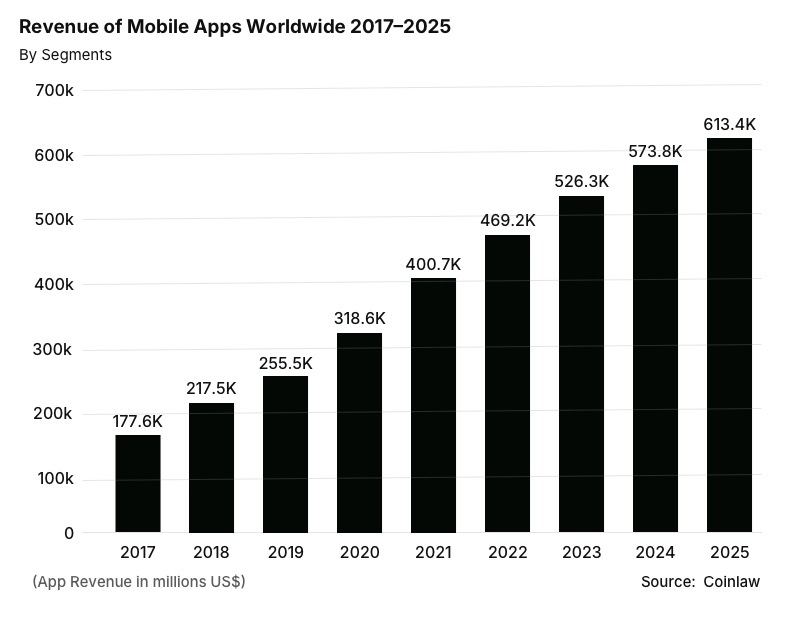
iOS apps have become central to how we live and work, from managing finances to booking healthcare appointments or running businesses. The growth of the industry speaks volumes as mobile app revenue is set to reach $613.4B by 2025, which is more than threefold compared to 2017 clearly showing how much users can hardly live without these apps.
Nevertheless, although iOS is designed to be safe, the majority of the risks are not caused by the platform itself. They emerge in the mobile app development lifecycle, be it a poorly configured setting, insecure coding, or insecure communication with the server. A security-oriented approach on all degrees of development is not only a best practice, but also a way developers keep their users and their own reputation safe.
Turn iOS development risks into your next triumph.
Our proven strategies build secure, high-performance apps that users love and the App Store rewards.
How Attackers Target iOS Apps
Despite the effective security implemented by Apple, the iOS apps are not entirely immune to attacks. The first step in ensuring the safety of your app and the data of your users is to know how attackers work. In iOS mobile app development, the most frequent attack strategies include:
- Reverse engineering & code modification: Hackers attempt to look into your application or alter its functionality so that it gets passed protection.
- Intercepting network traffic: Network traffic is prone to being intercepted unless it is encrypted appropriately, revealing sensitive information about the user.
- Exploiting insecure storage: It is easy to access a datastore without encryption and obtain either the credentials to log in or personal details.
- Weak authentication flows: Lack of strong authentication may result in attackers gaining unauthorized access through poor implementation of the login or session management.
- Misconfigured backend APIs: Although your app may be secure, you may have servers or API vulnerabilities that hackers can use.
Apple offers effective security defaults such as iOS Sandbox and App Transport Security (ATS), which is not sufficient. Developers should be keen on adopting best practices to keep their applications safe against real-life attacks.
Read more – iOS App Development: Guide to Building High-Performance Apps
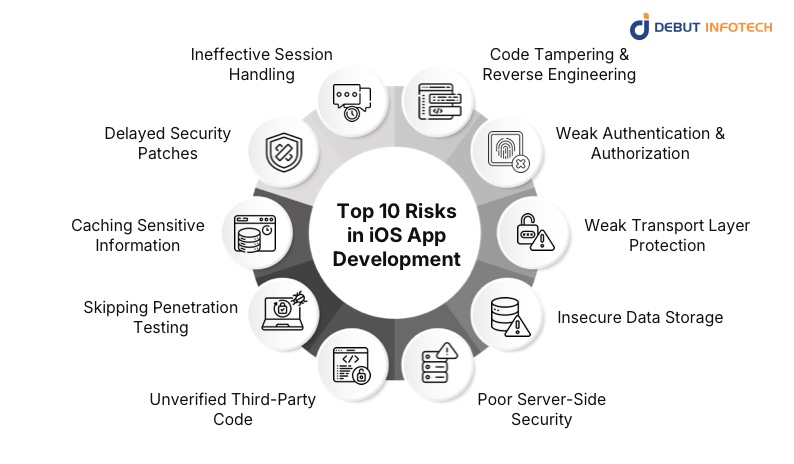
Top 10 Risks in iOS App Development and How to Handle Them
In the case of iOS apps, a minor error can prove to be a headache. Whether it is hackers that can have a go on your code or the weak authentication letting just anyone into your system, risks are real but can be manageable as long as you understand where to concentrate on. Here is a more detailed perspective on the highest challenges in iOS app development and how one can practically mitigate them:
1. Code Tampering & Reverse Engineering
Attackers can also alter app binaries or insert malicious code into cloned apps of popular apps. Suppose your app is duplicated in an unauthorized store and employed to steal sensitive data, that is a real threat. Altered versions of WhatsApp and Tik Tok have been spread with spyware installed, demonstrating the ease with which a code can be compromised. To begin the process of protecting your app, you need to make Swift code obfuscation enabled, Code signing and signature checks, runtime jailbreak detection, Runtime Application Self-Protection (RASP), and file integrity verification using hashes. These measures are necessary to provide secure mobile enterprise solutions that ensure the safety of business and user data.
2. Weak Authentication & Authorization
Bad login processes and bad session policies can provide attackers with easy access to your app. The case of the DoorDash breach in 2022 should be mentioned as a notable example because the breach was partially due to a third-party authentication issue. Enhance your application with Secure Enclave in biometric authentication, OAuth 2.0 or OpenID Connect in ensuring secure token-based logins, multi-factor authentication (MFA) or Passkeys, rate limiting, account lockout, and other policies. Authentication is essential in securing users, as well as your back-end systems
3. Weak Transport Layer Protection
In the absence of a robust TLS encryption, data on transit is prone to interception. Attackers may intercept communications and get passwords, payment details, or other sensitive information. Apple mandates the use of App Transport Security (ATS) which dictates the use of HTTPS with at least TLS 1.2 but TLS 1.3 is preferred. To counter this threat, add ATS to your Info.plist, use the pinning of the certificate anathema, and disable the old protocols such as HTTP or TLS 1.01.1. This will enhance privacy of user data and will make sure that your application is communicating in a secure way at all times.
4. Insecure Data Storage
When sensitive information is stored without encryption in a device, the attacker can easily extract it. As an example, Starbucks used to keep credentials in plaintext logs and put users at risk of breaches. This can be prevented using Keychain Services, file encryption with CryptoKit, Data Protection API such as NSFileProtectionComplete, and unneeded storage of sensitive data. The protection of user data privacy depends on secure storage practices.
5. Poor Server-Side Security
The majority of breaches occur on the server and not on the device. Unsecured API or exposed databases may be a major threat to user data. JWT token hardening of APIs, encrypting database fields, rate limiting and Web Application Firewalls (WAF) are all necessary actions taken to secure your backend.
6. Unverified Third-Party Code
It is easy to copy snippets online or to use libraries that have not been verified but this can cause unknown weakness. Use scan dependencies such as Snyk or Xcode’s SAST analyzer, stick to well-maintained Swift Packages, and audit any external SDKs before integration. This is particularly critical when your application is dependent on API development, because just a single poor dependency can result in a failure of the entire backend.
7. Skipping Penetration Testing
Even a well-developed app may contain some hidden flaws. Consistent penetration testing, such as SAST, DAST, and practical pen testing with tools such as the Burp Suite, ZAP, MobSF, or Frida, can be used to detect vulnerabilities before they are detected by attackers. Security audits in each of your big releases are a guarantee that your app will be resistant to new attacks.
8. Caching Sensitive Information
Auto-filled credentials or tokens in the cache can be convenient to users, but can easily be abused in the event of losing or stealing a device. Disabling keyboard caching of sensitive fields, saving tokens instead of UserDefaults in Keychain and not allowing app snapshots with isScreenCaptured flags can be used to protect confidential data.
9. Delayed Security Patches
The use of old versions of apps exposes users to known vulnerabilities. To ensure a secure and trusted app experience, it is vital to implement the CI/CD pipelines to deploy patches as quickly as possible, observe vulnerabilities using such tools as Sentry or Crashlytics, and read the comments published by the App Store.
10. Ineffective Session Handling
Prolonged sessions are also a threat to safety in case a device is lost or an account is hacked. Temporary session tokens, the need to re-authenticate when performing critical operations, binding of sessions to either device ID or IP addresses and allowing a session to automatically expire after a specified inactivity time are all important elements to mitigating this risk.
Related Read: Top 8 Mobile App Development Legal Issues You Need to Know
Addressing these risks directly will allow you to produce iOS applications that are more than just functional but actually secure and protect your users, your backend systems and your reputation. By doing so, you will also guarantee that your app is in compliance with the current requirements of a secure enterprise mobility solution, API development, and user data privacy protection.
Essential Apple Security Tools Every iOS Developer Should Rely On
Apple does not leave the developers guessing when it comes to the creation of safe and trustworthy iOS applications. The platform is designed with strong security structures that serve as guardrails, assisting you to create applications that uphold user privacy, minimize risk and adhere to robust app security governance and policies without introducing unneeded complexity.
Below is a basic table which breakdown the fundamental security tools that every iOS developer must be familiar with and what they contribute to the table:
| Framework / Feature | What It Helps You Protect |
| Keychain Services | Stores passwords, API keys, and tokens securely so they never end up exposed. |
| Local Authentication (Face ID / Touch ID) | Adds biometric verification to strengthen logins and sensitive actions. |
| CryptoKit | Gives you modern, efficient encryption and hashing tools for safer data handling. |
| App Sandbox | Keeps your app isolated, preventing unauthorized access to files and system resources. |
| Secure Enclave | Handles operations like biometrics and key generation in a hardware-level secure environment. |
| App Transport Security (ATS) | Enforces secure network connections, blocking outdated and insecure communication channels. |
| Data Protection APIs | Encrypts user data at rest and controls when apps can access it. |
| DeviceCheck API | Helps detect fraudulent devices, repeat abuse, or suspicious usage patterns |
By depending on these frameworks at the beginning of the project, developers have to spend less time worrying about vulnerabilities and more time creating features that make people fall in love with their project. These tools are the foundation of risk reduction in iOS development provided you are serious about it.
Real-World Case Studies: How iOS Apps Actually Get Compromised
Security risks feel much more real when you look at how they’ve affected companies people use every day. These examples highlight why a thorough vulnerability assessment can catch issues long before they reach users.
1. Starbucks: Plaintext Credentials Stored on Devices
Storing sensitive information in plain text is an expensive lesson that Starbucks had to learn. Their iOS application stored user credentials in a plain-text form on the device, and thus they could be read by any user with access to the file system. The issue came down to using default storage instead of secure options like Keychain. A routine vulnerability check and proper credential storage would’ve easily prevented this
2. DoorDash: Authentication Glitch That Exposed User Data
DoorDash ran into a weakness where attackers could manipulate authentication tokens. The underlying problem was weak validation around how those tokens were created and verified. If the team had incorporated stronger validation logic and regularly tested their authentication flows, this flaw would’ve been caught long before researchers flagged it.
3. TikTok: DNS Hijacking in Older App Versions
Certain older versions of TikTok were susceptible to DNS hijacking when users would tap into shared Wi-Fi networks. The application did not implement HTTPS completely and instead used network requests that were not correctly authenticated. Implementing stricter TLS requirements, adding certificate pinning, and reviewing the networking layer would have closed this loophole.
4. Banking Apps: Cloned Versions Injected With Malware
Several banking apps were illegally cloned and distributed on third-party app stores. Attackers injected malware into these copies, putting users’ financial data at risk. This was achievable since the original apps did not have effective cloning protection mechanisms. Some techniques, such as code obfuscation, signature verification, and in-app integrity verification, when coupled with user training on installing applications exclusively through the App Store would have made the attacks much more difficult to strip off.
Read more – Enterprise iOS App Development – Complete Deep Dive
Stop guessing at iOS security and performance.
Let’s audit your app’s risks and build a resilient strategy for long-term success.
Conclusion
Dealing with the risks in iOS development does not necessarily need to be intimidating. It is possible to secure user data and create apps that will inspire trust by addressing vulnerabilities early and using the best practices.
Debut Infotech, one of the leading iOS application development companies, integrates in-depth security knowledge with people-centric mindset to provide application development at rapid, trustworthy, and secure speed.
Are you willing to develop an iOS application your users can rely on? Contact Debut Infotech today and secure your app for the future.
Frequently Asked Questions (FAQs)
Q. What are the risks of Apple company?
A. Apple has a number of major threats that may affect its operations. Its high dependence on the sales of iPhones is one of the biggest concerns. The company is also highly valued in the market, and this may expose it to market movements.
– The competition is growing in every line of products and Apple has to cope with the issues in its supply chain, such as international tariffs.
– Also, Apple is increasingly under regulatory scrutiny, particularly in matters of antitrust. The company is also at risk of falling behind with a fast-moving sphere of artificial intelligence.
Q. Which is safer, iOS or Android?
A. iOS is perceived to be more secure. The closed ecosystem and the strictness of app review reduce the threats of malware. This also provides the user with quicker and more reliable updates.
– Android has become more secure over the years. Google Play Protect and other security features offer excellent security. Nonetheless, it is open-ended, which may predispose it to malware. This is particularly evident in cases where the apps are downloaded through unofficial sources or when the makers of the devices are slow with updates.
– User behavior at the end of the day contributes a lot towards remaining safe on either platform.
Q. What are the problems with iOS developers?
A. iOS developers experience a number of challenges. Among the significant problems is keeping the app performance and memory under control so that the app could be executed on every device.
– They should also ensure that their applications are compatible with other iPhones and iPad models and other iOS versions. The App Store approval process may be rigid and the app may have to meet high standards before being made live.
– Another challenge that continues to arise is maintaining high-quality UI/UX design because users are demanding smooth and intuitive experiences. Security issues and the expensive nature of hardware such as buying a Mac to create iOS applications are other obstacles.
Our Latest Insights



Leave a Comment